


Vlad and Niki: Kids Piano
4.755.00 Reviews
App Specs
- Version
- 1.5.1
- Updated On
- License
- Free
- Downloads
- 5,000,000+
- Developer
- Hippo Kids Games
- Categories
- Music
- Platform
- Android
Screenshots
 Analysis by AppCompare
When I first opened Vlad and Niki: Kids Piano, I understood its appeal almost immediately: it turns a phone or tablet into a bright, approachable musical toy for children. This is a free music game from Hippo Kids Games, built around Vlad and Niki and aimed at Everyone. The basic idea is simple enough for a young child to grasp without a long explanation, yet it gives parents a more constructive distraction than many games that rely only on rapid tapping.
My first impression was positive, but not because it feels like a replacement for a real piano. It does not. Its strength is the low barrier to entry. A child can touch the keys, hear the result, and begin experimenting without needing to understand notation, lessons, or complicated menus. That makes it especially suitable for a short play session at home, during a quiet moment, or when a parent wants to introduce the idea of making music without buying an instrument immediately.
What the first week feels like
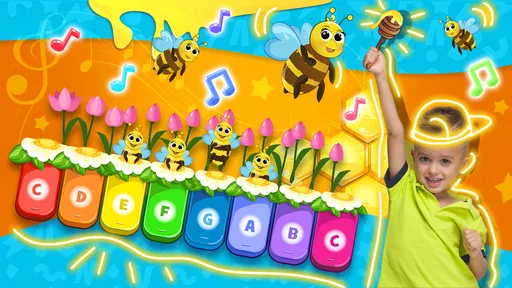
During the first few sessions, the game benefits from its clarity. Children do not need to read instructions fluently to understand that tapping the piano produces sounds. The Vlad and Niki theme also gives the experience a familiar character for children who already know the pair. Instead of presenting a serious practice environment, the game feels like a playful invitation to explore.
I would introduce it to a child by sitting together for the first session rather than handing over the device and walking away. That is not because the central interaction is difficult, but because a child gets more from it when an adult turns random tapping into a small activity: copy a short rhythm, find a higher sound, make a slow pattern, then try something faster. This approach makes the game feel less like passive screen time and more like a tiny shared music exercise.
One useful habit is to give the child a clear challenge before opening it. For example, I might say, “Can you make a sound pattern with three taps and then leave a pause?” That kind of prompt works better than asking for a song when the child has no musical vocabulary yet. It also reveals the app’s real educational value: it can encourage listening, timing, memory, and cause-and-effect awareness, even though it is presented as a children’s game rather than a formal lesson.
The first-week appeal comes from immediate feedback. A tap produces an audible response, so the child does not have to wait for progress bars, unlocks, or a complicated reward structure to feel involved. This matters for younger users with short attention spans. They can enter, experiment, and leave without a large commitment.
At the same time, parents should keep expectations realistic. The app is best understood as a piano simulator for children, not as a complete beginner course. It may help a child become curious about keyboards, but it will not replace a teacher, a structured lesson app, or regular time with an acoustic or electronic instrument. If your main goal is reading music, finger technique, or measurable progression, a dedicated learning tool will be a better fit.
Worth Reading Before You Choose

EA SPORTS FC Mobile 26 Is a Bigger Football Game, but It Takes Time

Flipboard Shows What News Apps Must Do Beyond the Feed

Switching to Android Auto Means Rethinking Your Driving Routine

Google Calendar Makes a Crowded Week Easier to Manage

Ludo King Makes the Most of the Minutes Between Plans

Baby Panda World Brings Quick Play to Modern Phones, but Its Game Library Feels Busy
The game is free to start, which makes trying it straightforward. There are in-app purchases ranging from $1.99 to $19.99 per item, so I would check the purchase settings before allowing a child to use the device independently. That is a practical point rather than a criticism of the musical interaction itself: children may tap enthusiastically through menus, and parents should remain in control of spending.
A better way to use the piano than random tapping
After the novelty of simply making sounds begins to settle, I found that the quality of the session depends heavily on how the adult frames it. A useful routine is to keep playtime short and give it one purpose. On one day, the purpose might be copying a rhythm. On another, it could be exploring low and high sounds. A third session might involve making a “question” with a few notes and answering it with a different pattern.
This turns the same piano surface into several small activities without pretending that the game contains a full curriculum. It is also a good way to avoid the common problem with simple children’s apps: the child enjoys the first few minutes, then starts tapping without listening. Asking the child to repeat a pattern or pause between sounds encourages attention rather than speed.
I would also recommend headphones only when the child can use them safely and comfortably, and only for a limited period. The game’s purpose is partly auditory, so excessive volume works against the experience. In a shared room, the device speaker may actually be preferable because a parent can participate and notice whether the child is exploring or merely pressing the screen repeatedly.
Whether it keeps earning attention after the novelty fades
The more important question is not whether a child enjoys the first day. Most bright, character-led music games can achieve that. The question is whether the app has enough recurring value to remain installed after the initial excitement disappears. In my view, this one can earn a place on a family device, but mainly as a lightweight activity that benefits from adult involvement. Its lasting value comes from repeatable musical play, not from a deep progression system.
For month-to-month use, I would treat it as one option in a rotation rather than a daily obligation. A child might return to it when interested in sounds, when waiting, or when a parent wants a calmer alternative to a more competitive game. It works particularly well as a bridge between entertainment and creative play. The child is not only consuming a story or watching an animation; they are producing something, even if the result is simple.
That distinction is important. A real piano offers richer control, more expressive possibilities, and a path toward serious practice. A formal music-learning app may provide lessons, exercises, and clearer progression. A toy keyboard may be more comfortable for repeated play and may not tie the child to a screen. This app sits between those choices: it is more accessible than an instrument, more playful than a lesson platform, and more interactive than a music video.
That middle position is both its advantage and its limitation. Families who want a quick introduction to keyboard sounds may find it useful for a long time. Families looking for a complete musical education may outgrow it quickly. I would not judge that as failure; it simply means the app has a specific job. It is a low-pressure starting point, not the final destination.
One realistic everyday use is a short waiting period before dinner or while a parent finishes a household task. Rather than opening a game built around endless levels, a child can spend several minutes making patterns and showing them to an adult. The session has a natural stopping point because there is no need to “finish” a long mission. That makes it easier to keep the activity contained, provided the parent gives a clear time limit.
Another use is preparing a child for a first encounter with a keyboard. Before attending a music class or visiting an instrument shop, a child can become familiar with the basic idea that different keys produce different pitches. The app cannot teach proper posture or technique, but it can reduce the intimidation of seeing a keyboard for the first time.
What makes repeat play worthwhile
The strongest repeat-play opportunity is not hidden content that I would promise every family. It is the ability to create small variations in how the child interacts with the piano. Parents can use imitation games, sound comparisons, pauses, and simple memory challenges. Those activities cost nothing beyond attention, and they help the same basic interaction feel fresh for longer.
I also like the possibility of using it with siblings, although this depends on their ages and patience. One child can make a short pattern while another tries to copy it. This turns the app into a cooperative listening game rather than a solitary screen activity. The trade-off is that the device itself may become a source of arguments, so shared play works best when the rules are decided beforehand.
For a child who already takes piano lessons, the app can serve as casual downtime, but I would not use it as a substitute for practice. It does not create the same physical discipline as pressing full-size keys, and a child may develop the habit of tapping without thinking about hand position. Used occasionally, it can keep musical curiosity alive between lessons; used as the only keyboard experience, it offers a much thinner foundation.
The game has an average rating of 4.7 from around 8.7 thousand ratings, and it has passed 5 million installs. Those figures suggest that its simple concept has broad appeal, but popularity should not be confused with depth. A large audience is reassuring when deciding whether an app is worth trying, yet the more useful question for a parent is whether its modest style matches the child’s needs.
Maintenance, supervision, and the small frictions
The maintenance burden is fairly light in practical terms. The current version is 1.5.1, and the game runs on Android 7.0 or later. For a family using a reasonably current Android device, installation should be uncomplicated. Still, “light maintenance” does not mean “no supervision.” Parents should review the purchase controls, choose whether the child needs sound on or off, and decide where the app fits into the household’s screen-time routine.
I would also keep the device in a stable position during play. A young child pressing keys enthusiastically can easily shift a phone or tablet, especially on a smooth table. A protective case and a clear play area are more useful than they may sound. The app itself is simple, but the surrounding setup determines whether the session feels calm or turns into a scramble to catch a sliding device.
Because this is a touch-screen piano, the experience depends on the size and responsiveness of the device. On a small phone, a young child may have less room to place fingers accurately, and several simultaneous touches may feel awkward. A larger tablet is usually more comfortable for shared play, especially when an adult is demonstrating a pattern beside the child. I would not buy a new device for this game, but I would choose the largest available screen if the family already owns more than one.
Sound is another maintenance issue. The piano interaction loses much of its point when the volume is too low to distinguish notes, but loud sound can quickly become irritating in a shared space. Establishing a volume rule before play prevents the child from treating the device as a button for increasing noise. This is also where adult participation helps: asking the child to listen closely makes moderate volume feel intentional rather than restrictive.
The main sources of fatigue are predictable. A child who wants a deep catalog of songs, complex challenges, or a strong sense of advancement may find the experience repetitive. The same basic piano interaction can be charming at first and limited later. Children who prefer action, stories, or competitive goals may move on even if they initially enjoy the characters.
Parents may also tire of repeated sounds, particularly when the child is experimenting without a clear activity. The best solution is not to demand that the child use it “correctly,” because open exploration is part of the appeal. Instead, I would alternate free play with a small listening challenge and end the session before the sound becomes background noise. Short, purposeful use protects both the child’s interest and the household’s patience.
There is also a trade-off between accessibility and precision. A simple interface lets a young child begin quickly, but it cannot offer the detailed control of a real instrument. A child may enjoy making a recognizable pattern without learning why it sounds musical. That is fine for creative play, but parents should avoid presenting the app as proof that the child is learning piano technique.
Who should choose it, and who should skip it
I would recommend this game to parents of young children who want a gentle music-themed activity with a familiar character connection. It is especially suitable when the goal is curiosity: hearing pitch differences, copying patterns, making sounds, and discovering that a screen can be used to create rather than only watch. It is also a sensible low-cost trial for families wondering whether a child might enjoy keyboards.
I would be more cautious if the child is expected to play independently for long periods. The app’s simplicity is helpful at the beginning, but it does not automatically generate enough variety to carry extended unsupervised sessions. I would also skip it as a primary choice for children who are ready for structured lessons, notation, technique, or a clear practice plan. In those cases, a real keyboard, teacher-led instruction, or a dedicated educational platform will offer more meaningful progress.
Families with strict limits on in-app spending should configure those limits before installation or first use. The game is free, but optional purchases between $1.99 and $19.99 per item mean that “free” should be understood as an entry point rather than a guarantee that every part of the experience has no cost. That does not make it unsuitable, but it does make parental setup part of the decision.
My long-term verdict
After the first-week charm has passed, I still see a reason to keep this game available, but I would not make it the centerpiece of a child’s music routine. Its lasting value depends on using it deliberately. Ten minutes of copying rhythms, comparing sounds, or playing together can remain enjoyable well beyond the first installation. Endless unsupervised tapping is much more likely to become tiring.
What I appreciate most is its accessibility. Hippo Kids Games has taken a potentially intimidating instrument and reduced it to an interaction a child can understand almost immediately. That makes the game useful as a first step, a waiting-room activity, or a shared parent-child experiment. It also avoids the pressure that can make formal learning feel like work before a child has developed interest.
What holds it back is the same simplicity that makes it welcoming. It does not offer the depth I would want from a serious piano-learning tool, and its recurring appeal may be limited for children who need constant goals or variety. The app earns lasting space best when it is treated as a small musical toy, not as a complete course or a replacement for an instrument.
My recommendation is therefore positive but specific: install it if you want an easy, child-friendly way to explore piano sounds and you are willing to guide occasional play. Keep sessions short, use simple listening challenges, and let the child move on when interest fades. If that matches your family’s needs, this free Everyone-rated music game is worth trying. If you need structured musical progress, choose a more specialized alternative and regard this one only as a casual introduction.
Pros
- Simple piano interface suitable for preschool children
- Bright visuals and familiar characters keep kids engaged
- Large keys make tapping easy on small screens
- Short melodies provide quick
- satisfying play sessions
- Works well as a basic first introduction to musical notes
Cons
- Limited musical depth may feel repetitive for older children
- Character-focused design may not appeal to every child
- Some content may require in-app purchases or ads
- Touch accuracy can be inconsistent on smaller devices
- Requires parental supervision for younger children
FAQs for Vlad and Niki: Kids Piano
What is Vlad and Niki: Kids Piano?
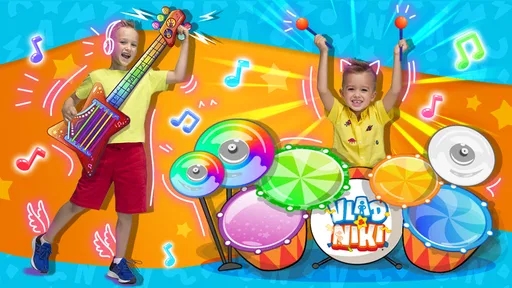
Vlad and Niki: Kids Piano is a colorful music game designed for young children and fans of the Vlad and Niki characters. It offers a simple piano-style interface where kids can tap keys, play familiar melodies, and interact with cheerful sounds and visuals. During testing, the controls felt straightforward, making the app suitable for preschoolers who are beginning to explore rhythm, music, and touch-based games.
Is Vlad and Niki: Kids Piano suitable for toddlers and preschool children?
The game is primarily aimed at young children, especially toddlers and preschoolers who can recognize basic colors, sounds, and touchscreen controls. Its large buttons and uncomplicated gameplay make it easy for small hands to use without reading advanced instructions. Parents should still supervise younger children, particularly when the device is connected to the internet or when the app includes advertisements or optional purchases.
Does Vlad and Niki: Kids Piano work without an internet connection?
Many of the basic piano activities can generally be enjoyed after the app has loaded, but offline availability may depend on the version installed and the device being used. Some advertisements, updates, or additional content may require an internet connection. If you plan to use it while traveling, open the game beforehand and test the main features in airplane mode so you know what remains accessible.
Are there advertisements or in-app purchases in Vlad and Niki: Kids Piano?
Parents should check the current store listing before downloading because advertising, paid content, and purchase options can change between updates, regions, and device platforms. Children may accidentally tap banners or purchase prompts if left unattended. For a safer experience, use parental controls, disable unauthorized purchases, and review the app’s permissions and privacy information before allowing a child to play.
Is Vlad and Niki: Kids Piano educational or mainly for entertainment?
Vlad and Niki: Kids Piano is mainly an entertainment app, although it can provide a gentle introduction to musical interaction. Tapping keys may help children practice hand-eye coordination, recognize different sounds, and experiment with rhythm. However, it should not be considered a complete piano-learning course. Children who want structured musical education will eventually need guidance, age-appropriate lessons, and a more advanced learning application.


